Always check amounts and recipients before sending.
Base URL: https://api.faygaw.org/v1. Keep your API key on your server.
Create a session with a product description and your reference.
Open the returned checkout_link; the customer chooses Wave or Orange Money.
Keep checkout_id and use GET /checkouts/{checkout_id} to confirm payment.
Simplified Postman collections.
Payout and Direct-Link each provide separate Wave and OM creation requests. Only base_url, api_key, expected_environment and payout_phone_number are used where applicable. Edit all other examples directly in the requests. Idempotency-Key headers and references already contain examples: change them for a new operation and keep them for a retry. For a read, replace the example ID in the URL with the ID returned by creation.
Use Authorization: Bearer <api_key>. Keys start with fg_sbx_ for SANDBOX or fg_prod_ for PROD. The full key is authenticated; its prefix alone grants nothing.
Scopes: checkout:write to create, checkout:read to read and balance:read for balances. Keep keys server-side.
Prepare your integration in the portal
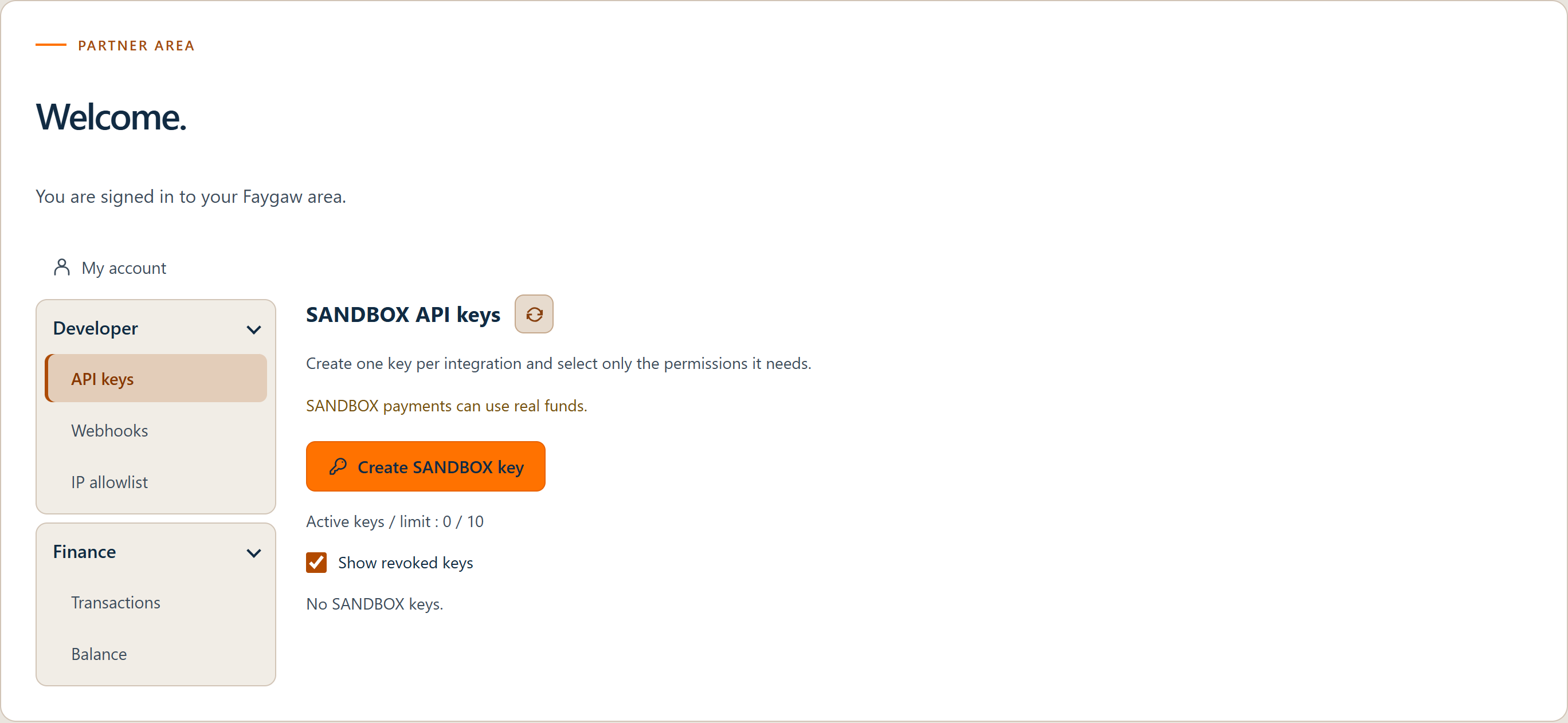
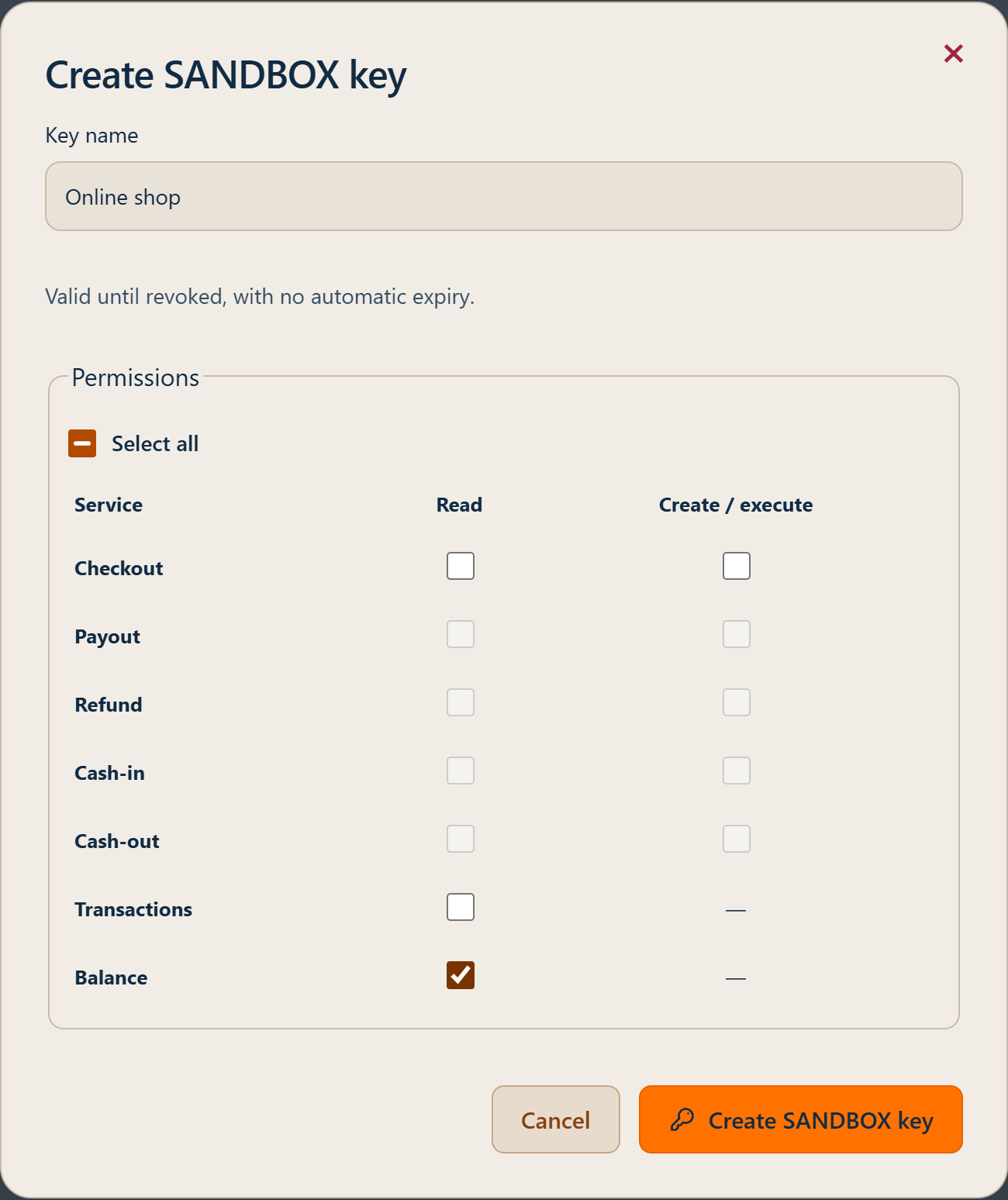
Under Developer in the Partner portal, create an API key and configure your servers’ public IP addresses and webhook endpoints. Select only the required permissions and keep keys and secrets on your server.
In the API key list, use “Edit permissions” to add or remove permissions without changing the key used by your integration. Its secret is not shown again. Clearing all permissions blocks API calls using that key without revoking it. For both creation and editing, select only the permissions you need.
The Developer and Finance menus provide access to integration tools and financial operations.Creating an API key: name the integration and select its permissions.
In Transactions, MSISDN displays the customer account in international format without + (digits only). Details also show the raw account received from the provider. For a Senegal partner, a nine-digit local OM number is normalized with 221; an international Wave number keeps its country code. Exact search accepts an international number with or without +, or a national format when the country is known. UTC dates use two lines and the period/search filters are grouped.
Allow your server IP addresses
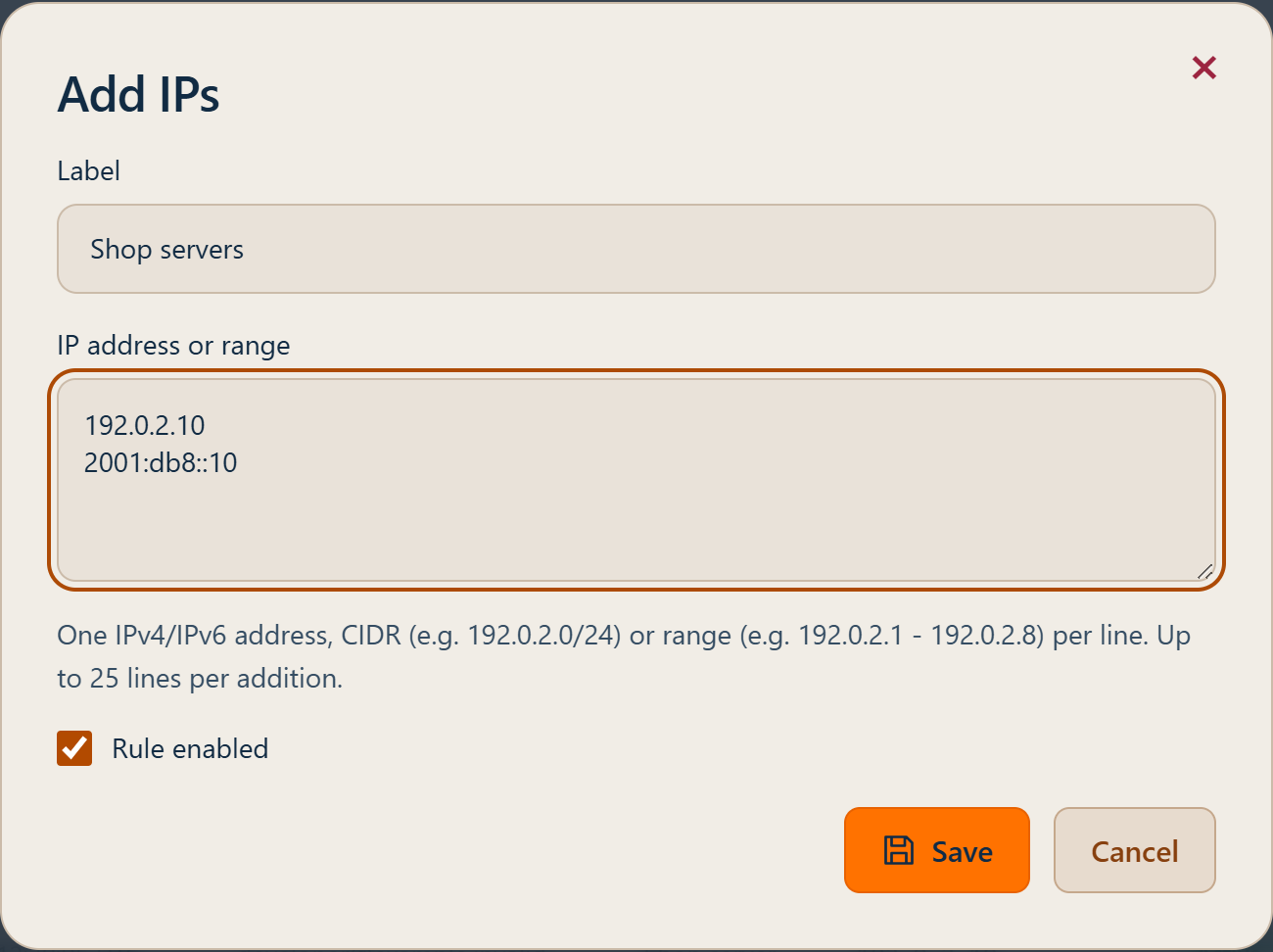
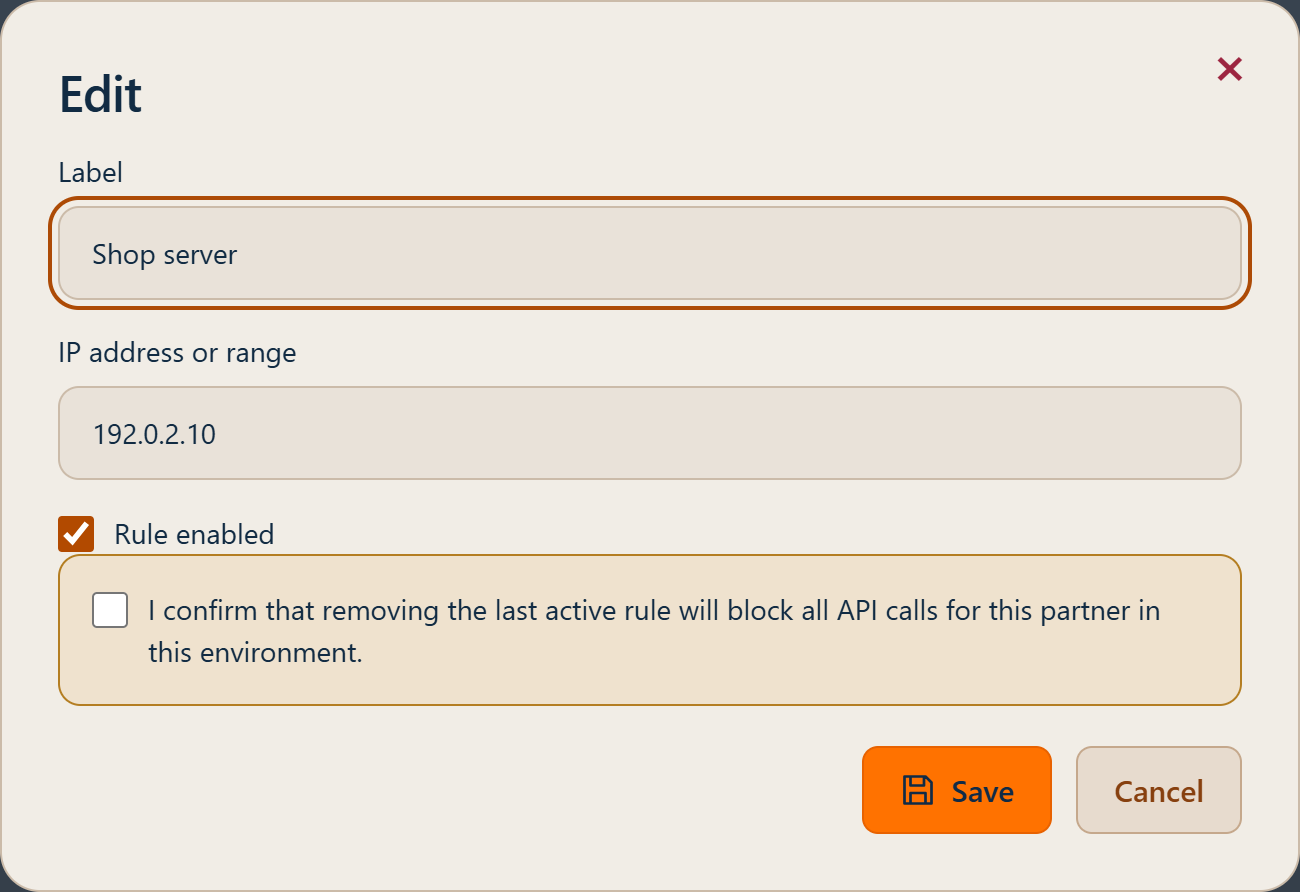
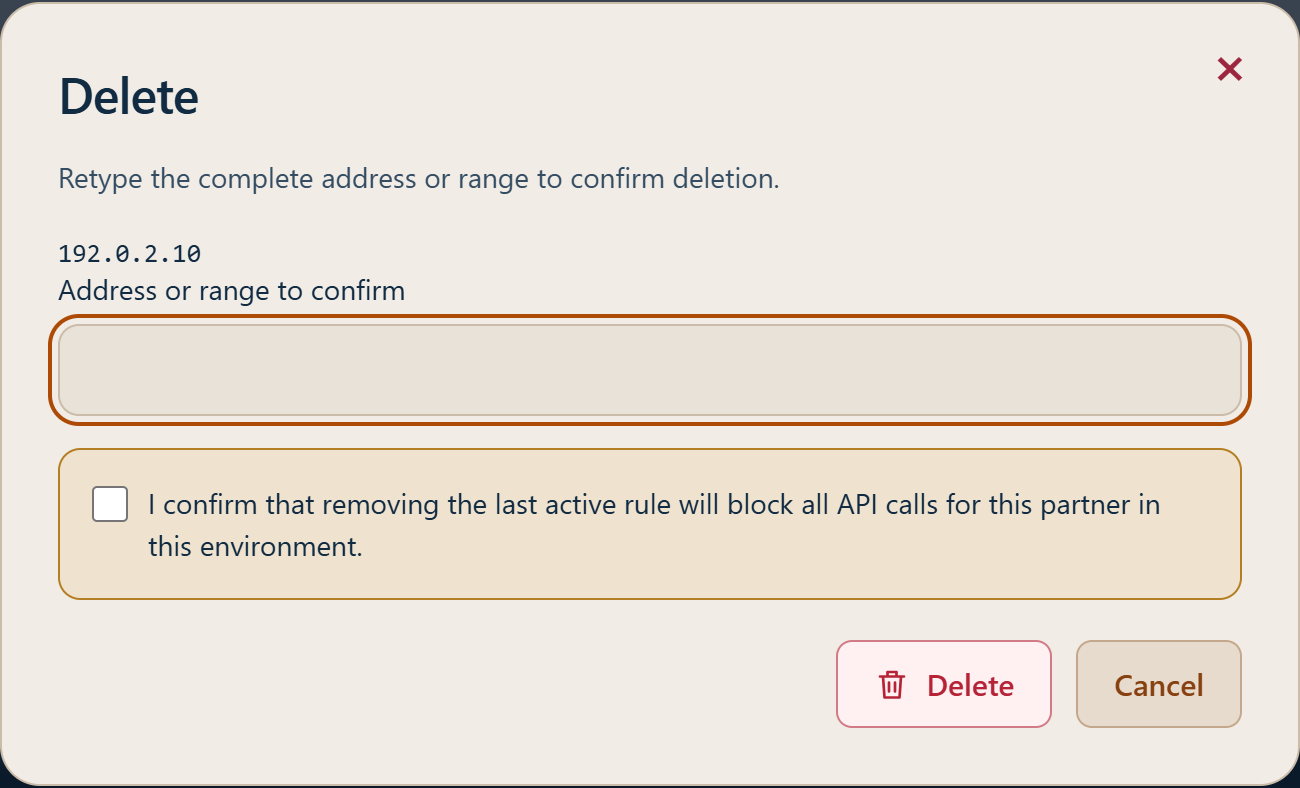
Configure your servers’ public outbound IP addresses under Partner > Developer > IP allowlist. IPv4, IPv6, CIDRs and ranges are accepted: one entry per line, up to 25 lines per addition. Without an active rule matching the source IP, the API returns HTTP 403 ip-not-allowed. Removing the last active rule blocks API calls in that environment. Wait until activation is shown before testing. This list does not apply to customer payment pages or your webhook receiver.
Adding allowed IPs: enter one address or range per line.Editing an IP rule: change its label, address or enabled state.Deleting an IP rule: re-enter the complete address to confirm.
In “My account”, enable MFA by scanning the QR code with your authenticator app. The key is also available for manual entry. Enter the six-digit code from the app to confirm; complete setup within 10 minutes, otherwise start setup again.
Portal transactions
View operations and their details in the Partner portal. Use the identifiers returned by the API to find them.
Environments
The same URL, https://api.faygaw.org/v1, serves SANDBOX and PROD. The authenticated key determines the Partner and environment. Request parameters cannot change the environment.
SANDBOX specifics
Use an fg_sbx_ key for SANDBOX and an fg_prod_ key for PROD.
Always check amounts and recipients before sending.
SANDBOX limits apply independently per provider and partner. The default minimum is 10 XOF for Checkout and 100 XOF for Payout. SANDBOX minimums and limits can be adjusted upon the partner’s request to Faygaw, subject to approval. Follow the limits reported in the error response and contact Faygaw if an adjustment is needed.
Amounts and currencies
Amounts are strings in the requested currency. For XOF, use a positive whole amount; a decimal suffix containing only zeros is accepted and normalized. Keep returned amounts as strings to preserve precision.
Idempotency
Idempotency-Key is optional and recommended for Checkout: 1–191 printable characters, high entropy, no expiration. Reuse the same key and body after an uncertain response.
An identical normalized request replays HTTP 201 with the original session; a changed body returns HTTP 409. Scope is partner, environment, operation and key. client_reference is required but not unique; also retain checkout_id.
Rate limits
HTTP 429 indicates that a request limit was reached. Respect Retry-After before retrying with the same idempotency key and body. Do not replace an operation whose outcome is uncertain.
Creates a Checkout session and returns the payment link to open for the customer. client_reference is required; Idempotency-Key is recommended. Reuse the same key and body after an uncertain response. Invalid input returns HTTP 400 with error.message and, when applicable, error.details[].field. Use the bounds stated in an amount error.
Always check amounts and recipients before sending.
Retrieves the current Checkout state. provider, provider_reference, faygaw_partner_fee and net_amount may be null before a payment method is selected. A browser return does not confirm payment.
Creates Direct-Link Checkout with Wave or Orange Money in Senegal, in XOF. Return launch_options to your application: WAVE for Wave; ORANGE_MONEY and MAXIT for Orange Money, even when their URLs are identical. Use checkout:write, an allowed IP and preferably a stable Idempotency-Key. Its scope is separate from Hosted Checkout. Changing the provider or body with the same key returns HTTP 409. After a timeout, keep the same key and body. A 503 response may include a checkout snapshot: retain its identifier. Confirm payment using GET or signed checkout.paid.
Always check amounts and recipients before sending.
OPEN, PROCESSING and UNKNOWN do not prove payment. SUCCEEDED confirms payment. FAILED, EXPIRED and CANCELLED are terminal states without successful payment. Use the API status and signed events. In Hosted Checkout, customers select a payment method. Return URLs serve navigation and never constitute payment proof.
Payout is available with Wave and Orange Money in Senegal, in XOF. amount is the amount to send to the recipient. Idempotency-Key is required and client_reference must be unique. Use international digits without +, for example 221771234567. For Orange Money: provider: ORANGE_MONEY. HTTP 201 CREATED with status PROCESSING confirms creation; the final outcome is asynchronous. Retrieve GET /payouts/{payout_id} or subscribe to payout.succeeded and payout.failed. An idempotent replay preserves the initial response. UNKNOWN means the final payout outcome is not yet determined. Do not submit a replacement operation. Retrieve the existing payout until a terminal status is returned.
Always check amounts and recipients before sending.
POST/v1/payoutspayout:write
Create a Payout
AuthenticationBearer API key
IdempotencyRequired
Formatapplication/json
Parameters
Field
Type
Presence
Description
Example
amount
decimal string
required
Exact recipient amount.
100
currency
string(3)
required
Payout currency.
XOF
provider
enum
required
Payment provider: WAVE or ORANGE_MONEY.
wave
recipient.phone_number
string
required
International digits without + (221…). A legacy + prefix is accepted for compatibility.
221XXXXXXXXX
client_reference
string 1–255
required
Unique business reference for your payouts in the environment.
Returns the current payout state. After replaying creation, use this GET to read its latest state. UNKNOWN means the final payout outcome is not yet determined. Do not submit a replacement operation. Retrieve the existing payout until a terminal status is returned.
Check the key and its environment; do not retry in a loop.
403
ip-not-allowed
The source IP address is not allowed.
Use an allowed IP address or update your allowlist.
403
forbidden-scope
This API key is not authorized for this operation.
Use a key with the required scope.
429
rate-limited
Too many requests. Retry later.
Apply backoff; avoid aggressive retry loops.
500
internal-error
An unexpected error occurred.
Keep request_id; retry cautiously according to idempotency rules.
503
service-unavailable
The service is temporarily unavailable.
Retry with backoff. For a mutation, keep the same idempotency key.
After validating the request and reserving funds, Faygaw returns HTTP 201 with status PROCESSING. The payout is processed asynchronously. Subscribe to payout.succeeded and payout.failed for its final outcome; GET /payouts/{payout_id} returns its current state. An idempotent replay preserves the initial response and does not send another payout. UNKNOWN means the outcome is still undetermined: preserve the same key and do not create a replacement payout.
Payout statuses
PROCESSING: processing in progress. PENDING: outcome pending. UNKNOWN: outcome undetermined. SUCCEEDED: payout succeeded. FAILED: payout failed. Only SUCCEEDED and FAILED are terminal. UNKNOWN means the final payout outcome is not yet determined. Do not submit a replacement operation. Retrieve the existing payout until a terminal status is returned.
Fully refund a paid Checkout belonging to your account. The principal and original FAYGAW fee are returned to the Partner; no new Refund fee is added.
POST/v1/refundsrefund:write
Create a Refund
AuthenticationBearer API key
IdempotencyRequired
Formatapplication/json
Parameters
Field
Type
Presence
Description
transaction_id
string ≤ 40
required
The FAYGAW transaction_id of the paid Checkout; neither its co_ id nor a provider identifier.
client_reference
string ≤ 255
required
Your business reference, unique among Refunds for your account and environment. Separate from the idempotency key.
reason
string ≤ 255 | null
optional
Nonempty reason when provided; may be omitted or null.
Send Authorization: Bearer, Content-Type: application/json and Idempotency-Key (1–191 characters). No query parameters. Provider, currency, amount and recipient are resolved from the original payment; do not send them. Only one full refund is allowed per payment.
Retain error.code and error.request_id (also returned in X-Request-Id) for troubleshooting. Do not infer financial status from a transport error.
Request one additional attempt on an existing Refund after the automatic 72-hour window. The original amount and fee restitution are preserved.
POST/v1/refunds/{refund_id}/retryrefund:write
Retry a Refund
AuthenticationBearer API key
IdempotencyRequired
Formatapplication/json
Parameters
Use the existing ref_ and keep its client_reference. Send Authorization: Bearer, Content-Type: application/json and Idempotency-Key (1–191 characters). Empty JSON object {}, no query parameters. Do not send an amount, provider or new reference.
Automatic retries run for at most 72 hours from the original request. A refused attempt does not make the payment permanently non-refundable. After that limit, retry the same Refund with POST /v1/refunds/{refund_id}/retry and a new Idempotency-Key: one attempt, without opening another automatic 72-hour cycle. Reuse the same key and body after a lost response. HTTP 202 acknowledges acceptance, not completion; use GET. An already SUCCEEDED Refund triggers no new provider send. No new FAYGAW fee; amounts are confirmed returned only at SUCCEEDED.
Refund not found for this account and environment.
409
refund-retry-not-due
The automatic 72-hour window has not ended.
409
refund-retry-in-progress / idempotency-conflict
Attempt still in progress or key reused for another request.
401 / 403 / 429 / 503
See common errors
Authentication, permission, rate limit or unavailability.
A pending manual retry is reused; concurrent requests do not create multiple sends. After another uncertain response, use GET before deciding on another manual retry. Do not automatically loop on this endpoint.
Example error response
{
  "error": {
    "code": "refund-retry-not-due",
    "message": "The request conflicts with an existing operation.",
    "request_id": "req_refund_retry_example"
  }
}
Refund statuses and tracking
Status
Description
PROCESSING
Refund in progress.
UNKNOWN
Outcome not confirmed. Keep tracking; do not create a replacement.
SUCCEEDED
Refund confirmed.
FAILED
Attempt cycle failed; manual retry is available after 72 h. Later confirmation can establish SUCCEEDED.
A clear rejection releases that attempt’s reservations, while automatic retries may continue within the 72-hour window. An uncertain outcome retains reservations until confirmation. Automatic sends stop at expiry. FAILED describes a failed cycle and remains manually retryable; UNKNOWN does not prove that no refund occurred. Only SUCCEEDED confirms return of the principal and original FAYGAW fee.
An unavailable or timed-out refund verification is not a failed Refund and does not emit refund.failed. The result stays UNKNOWN and reservations are retained while restitution remains unconfirmed. Verification resumes automatically within the 72-hour window. After that window, use the same Refund’s manual retry; do not create a replacement request. Keep tracking with GET and process refund.succeeded when confirmed.
Reading the response fields
Field
Description
id
Refund identifier; store it for GET.
transaction_id / original_transaction_id
Refund transaction / original payment transaction.
checkout_id
Checkout that originated the payment.
refunded_amount / refunded_faygaw_partner_fee
Full principal / returned original FAYGAW fee, decimal strings in currency.
provider / provider_transaction_id
Original provider / nullable provider reference, including on success.
environment / livemode
Key environment / indicator inherited from the original payment.
created_at / updated_at / completed_at
UTC timestamps; completed_at is nullable until completion.
failure_code
Nullable failure code; provider-refund-failed when an attempt cycle ends with a confirmed rejection.
Idempotency and lost responses
After a timeout or lost response, resend the exact request with the same Idempotency-Key. The initial creation response is replayed: then use GET for the current state. Changing keys does not create a second refund of the same payment.
Notifications and reconciliation
Events refund.created, refund.succeeded and refund.failed follow the webhook signature and delivery rules. Deduplicate by event.id and apply the highest sequence: 1 at creation, 2 for the initial outcome, 3 if later confirmation corrects a failure. There is no refund.unknown event.
The Checkout’s historical status stays SUCCEEDED. Its optional payment_status distinguishes PAID from REFUNDED. Reconcile your business reference with id, original_transaction_id and received notifications.
Signed partner webhooks
Available events: checkout.paid, payout.succeeded and payout.failed. There is no payout.unknown event.
Requests are HTTPS POSTs without redirects. Faygaw-Event-Id and Faygaw-Delivery-Id identify the event and its delivery to this endpoint. JSON fields are id, type, api_version, sequence, created_at, environment and data.object. Amounts are integer minor-unit strings.
Verify Faygaw-Signature: t=timestamp,v1=signature against the raw body bytes before transforming JSON: HMAC-SHA256 with the complete secret over timestamp + "." + raw_body. Compare in constant time and check timestamp age using a tolerance configured on your server. Rotation produces two v1 values; either valid signature is sufficient.
Durably record the authenticated notification before returning any 2xx, such as 204. A JSON response body is not required. Deduplicate by event.id: a lost acknowledgement may cause redelivery. Verify the raw bytes, never a reserialized JSON object.
Browser arrival at success_url is never proof of payment. Use an authenticated webhook or GET /checkouts/{checkout_id}. Delivery failures never change the payment.
Configure webhooks in the backoffice
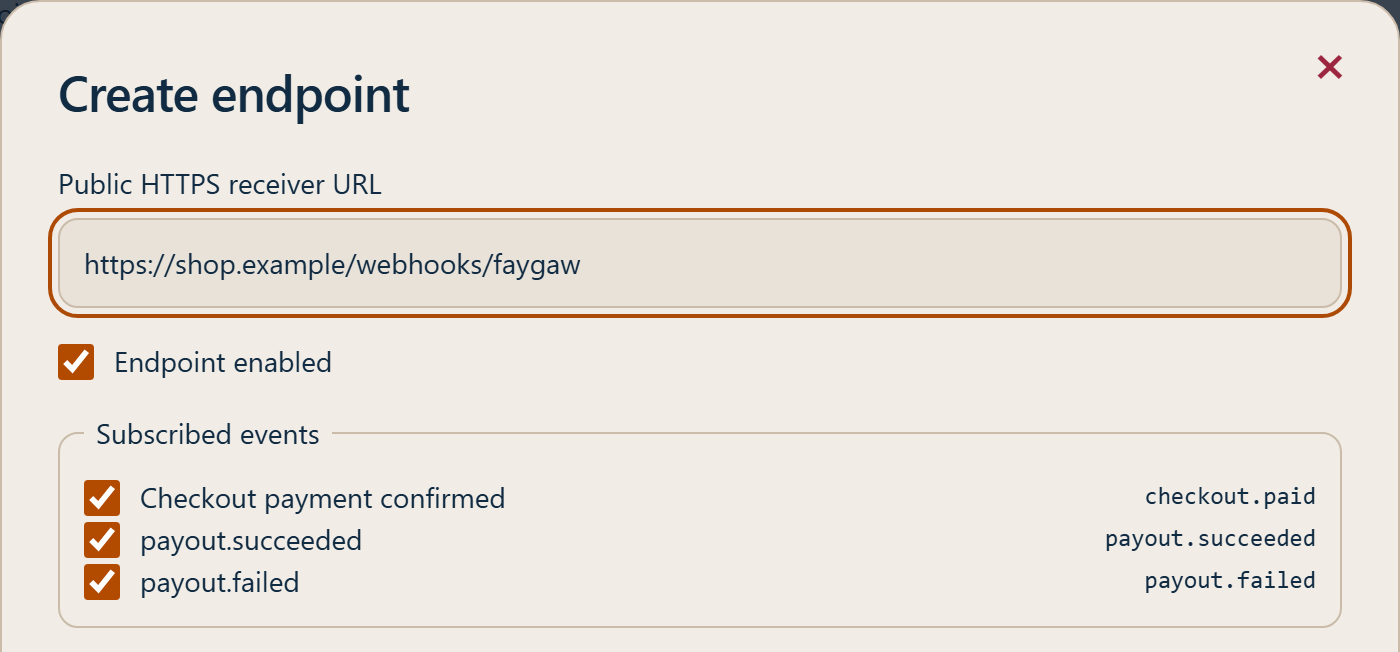
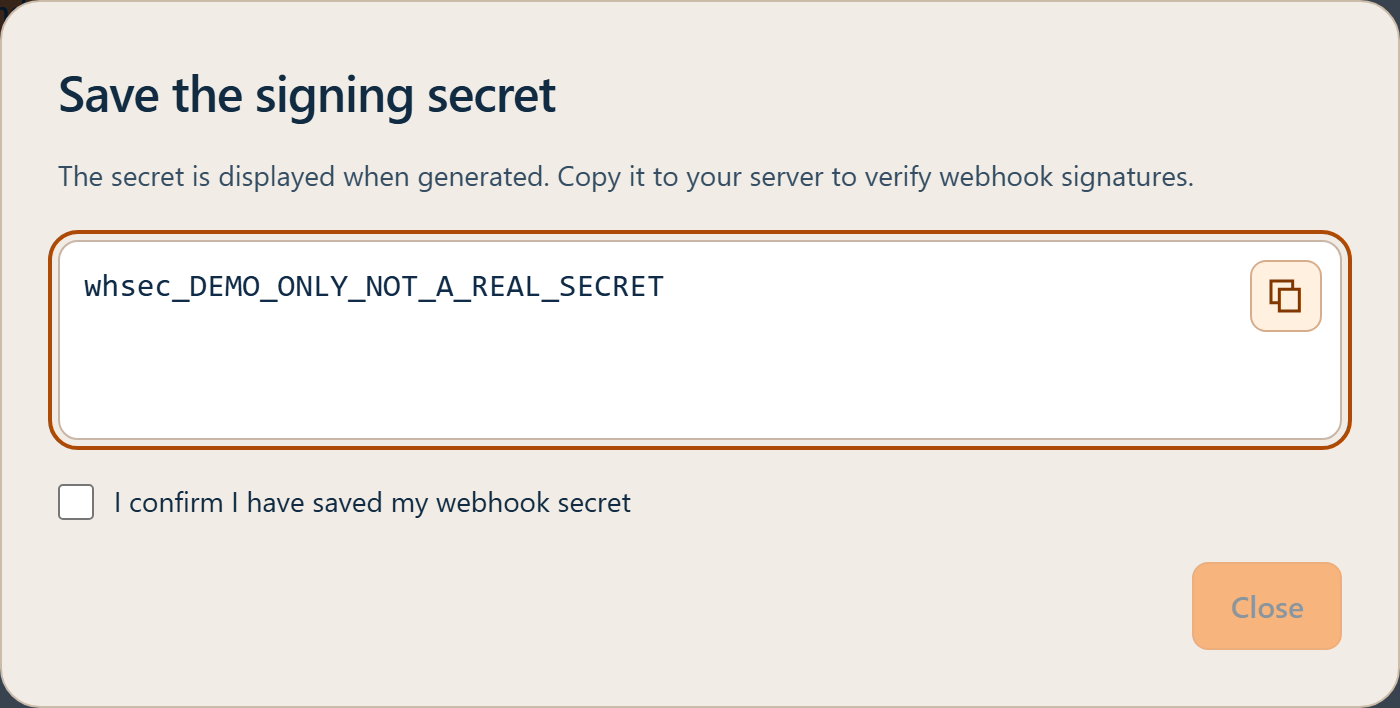
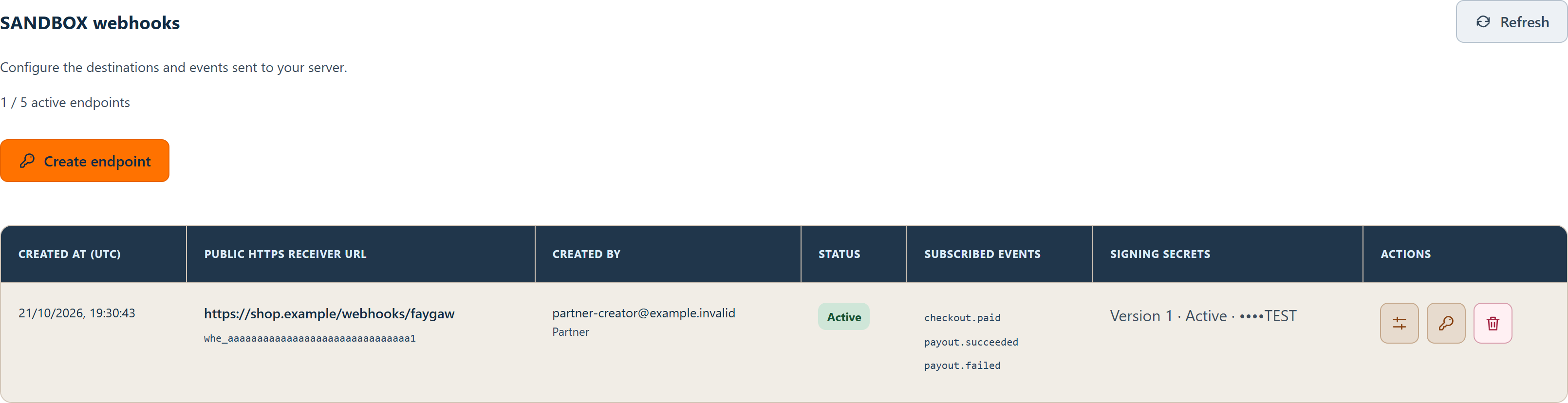
Under Partner > Developer > Webhooks, add a public HTTPS URL and select at least one event: checkout.paid, payout.succeeded, payout.failed, refund.created, refund.succeeded or refund.failed. Store the newly displayed secret on your server; it is separate from the API key. During rotation, old and new secrets may coexist. Complete rotation after updating your receiver. If the secret was not saved, rotate it.
An enabled endpoint automatically receives new events it subscribes to, with no additional activation. You can edit its subscriptions without recreating it.
Enter the HTTPS receiver URL and select the events to receive.Save the signing secret on your server, then confirm it has been saved. Demonstration secret with no real access.Find the created endpoint, its status and selected events.
Inspect webhook monitoring
When monitoring is available in your Partner area, open Developer > Webhooks. Data remains limited to your account and the selected environment. An unavailable PROD environment does not fall back to SANDBOX.
Tab
Purpose
Overview
Events created, expected deliveries, HTTP acknowledgements, retries, observed latency and pending deliveries. Delivery and attempt success rates use distinct denominators.
Configure endpoints
Manage HTTPS URLs, subscribed events and signing-secret rotation.
Webhook logs
Filter a period of at most 31 days, then open an event, a destination and its attempt history. Search uses an exact event, delivery, attempt or transaction identifier. Two attempts can be compared.
Health
Inspect five diagnostic checks and the seven-day delivery error rate for each endpoint. No observed activity or an insufficient sample does not establish that an endpoint is healthy.
One event may target several destinations: an acknowledgement from one destination does not mean that all have responded. HTTP 2xx confirms HTTP receipt, not business processing or signature verification by your server.
Archived headers and bodies load on demand. Signatures and sensitive data are masked in Partner portal responses, displays and copies; the signing secret is never revealed there. An empty body, no response received, partial or oversized content and an unavailable archive are distinct situations. Some unstructured content is withheld to protect sensitive data.
Displayed JSON may be formatted and redacted: it never replaces the raw bytes received by your server for HMAC verification. Controls marked unavailable do not send anything. Reading this history and delivery errors do not change your Checkout, Payout or Refund.
When available and permitted for your account, Test and Resend start one-off requests. From Health, Test opens a dialog showing the destination and a Start test button. No diagnostic starts before this click. The click immediately requests test execution; temporary unavailability may delay processing. The test runs five checks: server reachability, SSL certificate validity and expiry, rejection of an invalid signature, acceptance of a correctly signed request, and a response in under 15 seconds. The diagnostic sends two synthetic webhook.test requests, without an amount or financial operation: one with a deliberately invalid signature, then one with a fresh valid signature. Your receiver must support this diagnostic type without performing a financial operation. The test shop receiver distinguishes Checkout, Payout and Refund events; only checkout.paid triggers its order confirmation. HTTP 401 or 403 is expected for the invalid signature; another rejection, such as HTTP 400 or 404, does not establish signature enforcement and needs attention. Redirects are never followed.
The dialog displays durably recorded steps: Waiting, Running, Passed, Needs attention, Failed or Not run, followed by the final result. Closing the dialog stops on-screen tracking, not processing. Resuming tracking does not resend either request. A lost response is not reported as success and is not replayed automatically.
The error rate covers actual delivery attempts completed during the last 7 days, excluding diagnostic probes. It is green at 0%, warning above 0% through 20% inclusive, and red above 20%, with “High error rate — Check your endpoint”. With no real delivery attempt, the rate shows “No data” and does not contribute to the Health score. Five successful diagnostic checks therefore show 5/5 in green. Once real attempts exist, the historical error rate becomes the sixth criterion. Missing or unfinished diagnostic checks still count; the score remains neutral when no diagnostic is available or one is running.
Resend targets one delivery and its original destination: the same event bytes and ID, with a fresh signature and timestamp. You may redeliver an already acknowledged event. This does not repeat a payment, change a balance or extend automatic retries. Confirm the event and destination; your receiver must deduplicate using the event ID.
A recorded request is not yet a successful delivery. Permissions and limits apply; a retry time is shown when it can be determined. A changed URL or inactive endpoint blocks sending. After an uncertain result, check your logs before requesting another send. Stopping dialog tracking does not cancel the request; resuming its status does not create another send. One-off tests are separate from business event delivery statistics.
Removing an event type from your endpoint subscriptions prevents future sends and automatic retries for that type. Affected deliveries are stopped without deleting their history. Manual redelivery also requires an active subscription. An HTTP request already in flight may still receive a response; an established acknowledgement is retained. Resubscribing does not restart cancelled deliveries. Synthetic webhook.test diagnostics remain independent of business subscriptions.
In SANDBOX, active endpoints belonging to active partners also receive a daily diagnostic using the same five checks and synthetic webhook.test requests. Checks are spread throughout the UTC day and may be delayed by load or unavailable dependencies. An interruption does not replay every missed day. Health shows the latest result applicable to the current endpoint configuration; on-demand tests remain available. These diagnostics are excluded from business delivery statistics.
Partner events
checkout.paid confirms a paid Checkout. payout.succeeded confirms a successful Payout. payout.failed confirms a failed Payout. There is no payout.unknown event. Failure of an individual attempt does not establish final Checkout failure.
Delivery and retries
A 2xx response acknowledges delivery. After failure or a lost response, the same event may be redelivered with the same body, a new timestamp and a new signature. Redirects are not followed. Automatic retries may continue for 72 hours after the first send. Disabling or deleting an endpoint stops its pending retries. Deduplicate events, record them durably and acknowledge promptly; process long-running tasks separately.
Errors
Use error.code, HTTP status and request_id for diagnostics. HTTP 401 indicates authentication, 403 authorization, 404 an inaccessible resource, 409 a conflict and 429 a rate limit. A network failure or HTTP 503 never proves payment failure.
{
  "error": {
    "code": "invalid-request",
    "message": "The request is invalid.",
    "request_id": "example-request-id"
  }
}
Metadata
metadata lets you attach small business references to a resource. These values are returned in webhooks.
Rule
Value
Number of keys
Maximum 10
Key name
1–40 characters
Regex
^[A-Za-z0-9][A-Za-z0-9_.-]{0,39}$
Value
String only, max 255 characters
Never store secrets, passwords, documents, or sensitive data in metadata.
Best practices
Store checkout_id, transaction_id, client_reference, refund_id and the idempotency key with your order.
After a lost response or timeout, retry with exactly the same key and payload. A new key does not resolve financial uncertainty.
A replayed POST response may be the original admission response: use GET for the current state.
Never interpret PROCESSING or UNKNOWN as a confirmed refund or a definitive failure.
Check the server state; a browser redirect does not prove payment or refund completion.
Keep API keys and signature secrets on your server. Do not log tokens or the Hosted link fragment.
Verify the webhook signature against raw bytes, its timestamp and the expected environment.
Deduplicate notifications by event_id. Store them durably before returning 2xx, then process long-running tasks asynchronously.
Repeated or out-of-order delivery must never produce a second business effect. Use GET if a notification is missing or inconsistent. For Refund notifications, retain the highest sequence already processed. A later confirmation can correct a previous failure; consult GET before resolving a contradiction.
Respect Retry-After when supplied with HTTP 429. Retain X-Request-Id for support requests.